
Understanding…
It is important to first understand that quantum computing requires a different approach than classical computing. When we work with Quantum computers, we are working with materials such as atoms, ions, photons or electrons, which behave according to the laws of quantum mechanics, such as probabilistic computation, superposition, and entanglement.
Some concepts of Quantum mechanics.
- Superposition (or coherence) – The ability of quantum particles to be a combination of all possible states.
(you can have a certain probability of being 1 AND a certain probability of being 0. When a quantum particle is in a superposition state, it’s a linear combination of an infinite number of states between 1 and 0). To know which one it is…we use Quantum measurement. - Quantum measurement – The act of observing a quantum particle in superposition and resulting in one of the possible states.
The act of observing or measuring a quantum particle collapses the superposition state (also known as decoherence) and the particle takes on a classical binary state of either 1 or 0. Once a quantum particle has been measured, it stays in that state forever. *note: in quantum computing there are operations that can “reset” a particle back to a superposition state so it can be used for quantum calculations again. - Entanglement – The ability of quantum particles to correlate their measurement results with each other.
When particles become entangled, they form a single system such that the quantum state of any one particle cannot be described independently of the quantum state of the other particles. This means that whatever operation or process you apply to one particle correlates to the other particles as well. - Qubit – The basic unit of information in quantum computing. A qubit represents a quantum particle in superposition of all possible states.
Because of superposition, qubits can either be 1 or 0 or anything in between. Depending on its configuration, a qubit has a certain probability of collapsing to 1 or 0. The qubit’s probability of collapsing one way or the other is determined by quantum interference. - Interference – Intrinsic behavior of a qubit due to superposition to influence the probability of it collapsing one way or another. Interference affects the state of a qubit in order to influence the probability of a certain outcome during measurement, and this probabilistic state is where the power of quantum computing excels.
Quantum Simulators
Quantum simulators that run on classical computers allow you to simulate the execution of quantum algorithms on a quantum system. For this article i will use Microsoft’s Quantum Development Kit (QDK) which includes a full-state vector simulator along with other specialized quantum simulators.
Basic process for Quantum Computations
- Access the qubits
- Initialize the qubits to the desired state
- Perform operations to transform the states of the qubits
- Measure the new states of the qubits
Quantum Operations
Quantum operations are similar to logic operations in classical computing, such as AND, OR, NOT, and XOR.
Measuring
Measuring the result of the computation tells us an answer, but for some quantum algorithms, not necessarily the correct answer. Because the result of some quantum algorithms is based on the probability that was configured by the quantum operations, these computations are run multiple times to get a probability distribution and refine the accuracy of the results. Assurance that an operation returned a correct answer is known as quantum verification and is a significant challenge in quantum computing.
Development Environment
We will work with the QDK which includes Q# as a programming language. Why do I use QDK?
- Q# libraries that help you build real-world quantum applications right away.
- Targets, which allow you to run your program locally or on a variety of hardware through Azure Quantum.
- Tools that help you integrate quantum programs with classical programs, including support for C#, F#, and Python.
1. Install VSCode.
2. Install QDK for VSCode.
3. Install Quantum project templates.
- Press Ctrl+Shit+P and enter “Q#: Install project templates”
4. Create project
- Press Ctrl+Shift+P and enter “Q#: Create new project”- Select “Standalone console application” select the directory name your project and press Create Project.

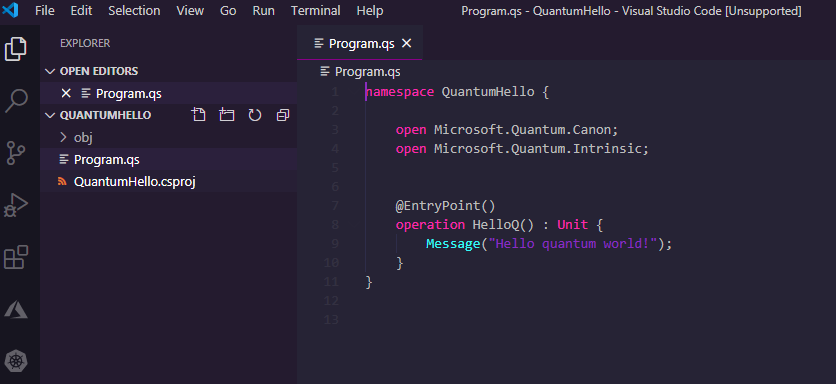
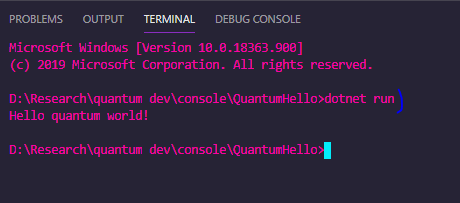
5. This is the result, as you can see we have two files a csproj and a qs. Lets open de Program.qs file. You can press Ctrl+Shift+P and open Terminal to test the following program. by running “dotnet run”.
Understanding the code:LibrariesAs you can see first we have the namespace which helps us organize functionality they are useful when we use Q# libraries in our programs.For example: Microsoft.Quantum.Chemistry when we call a function or operation from a library, we specify the library’s namespace. In the previous code that we have.. we specify two names. (we use “open”), Microsoft.Quantum.Canon and Microsoft.Quantum.Intrinsic.OperationsOperations (quantum subroutine), are the basic building blocks of a Q# program. You basically specify the name for the Operation (in our example is “HelloQ”), along with its inputs (zero in our example) and its output (type: Unit).TypesQ# provides familiar types like Int, Double, Bool and String. Also types that define ranges, arrays and tuples along with the specific to QC.
6. Understanding Simple Quantum Random bit generator
A classical computer don't generate random numbers but “pseudorandom” numbers based on some initial value which is often the CPUs clock.
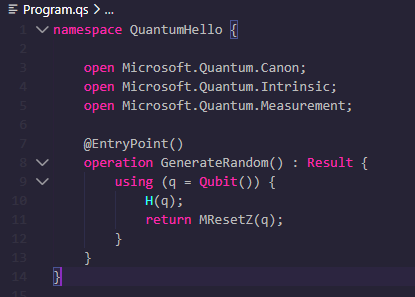
Quantum random generator uses an H operation to put a qubit into “superposition”, the measurement results in a zero or one.
Understanding the code:+ Added library Microsoft.Quantum.Measurement;+ Changed the name of the operation and the output from Unit to Result.+ Allocated a qubit with the using keyword.+ Put the qubit into superposition with operation H.+ Measured the qubit with operation MResetZ (resets the qubit to zero state, and returns measured value zero or one).

7 – Understanding Complex Quantum Random Number Generator.
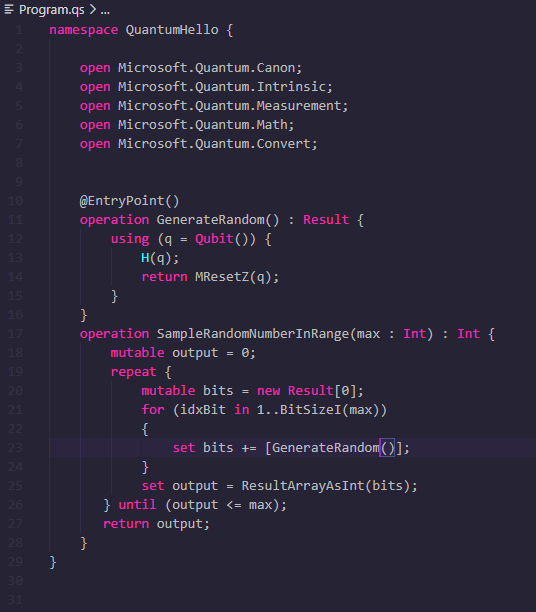
In our previous example we only got two results, a zero or a one. If you repeat the process four times, and generate: 0,1,1,0 if you concatenate this into a string, you have a 0110 binary number which is a 6 in decimal.
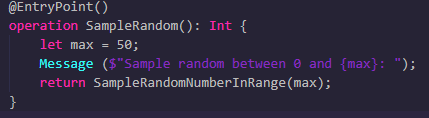
Understanding the code:+ We created a new operation that calls to our previews operation GenerateRandom. We set an output and input( named max, which is the max value we want to generate) as Int.+ We added two libraries Microsoft.Quantum.Math and Microsoft.Quantum.Convert.+ We created a Mutable variable named output.+ We repeat process that will repeat if our generated number in greater then our max.+ We create another Mutable variable named bits which will host the generated random value.+ We have then a for loop that works as the one in other programming languages and we calculate the number of bits we need to express integer up to max with the help of BitSizel function.+ Once we have the result, we set it to our output mutable variable with ResultArrayAsInt function that converts the bit string to a positive integer.Now in order to execute our operations we need to set a different EntryPoint.Understanding the code:+ Moved out @EntryPoint()+ Created a new operation with Int as output+ We set a max, wrote a message and return a the random.

What is Azure Quantum?
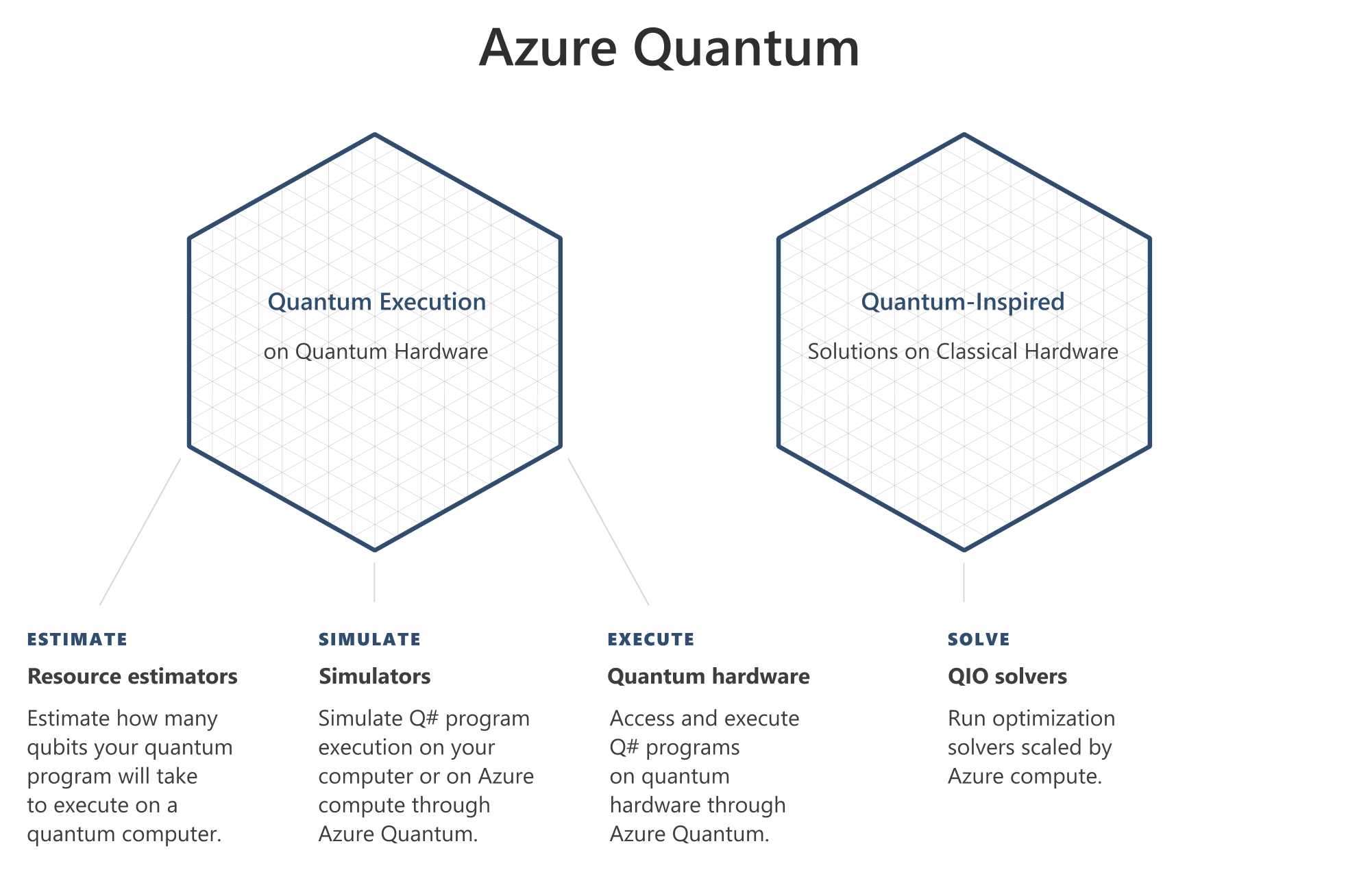
The examples we just ran in VSCode, ran in a simulator to mimic quantum behavior. If you already have your program ready to run on quantum hardware, that´s when we use Azure Quantum (Microsoft´s Azure Computing Service).
Considerations when using Azure Quantum
Azure Quantum offers a suite of tools that helps you understand quantum computer:
- There are tools such as the resource estimator, which helps you understand the resources that your code would require. This can mean the types of quantum gates you use, the number of operations performed, or the number of qubits you need.
- There are tools for simulating your programs so that you can test the behavior and performance of your code. It helps you iterate and improve your code, so that you can reduce the number of resources required to run it.
Azure Workspaces
Like any other Azure service, the Azure Quantum has a resource that is called Workspace, and is a collection of assets that are associated with executing a quantum or quantum inspired workload. You need to set.
– Target : quantum computer or simulator.
– Provider : Provider that run your target, it can be IonQ, Honeywell, QCI.
– Jobs : When you execute a quantum program you are creating and running a job…
– Billing : Will define how you are build for jobs depending on the selected provider.
Conclusion
As innovation continues to accelerate, quantum computing has become an increasingly important technology to monitor as part of the broader wave of digital transformation. Quantum computing aims to solve complex problems that are impossible to address with todays supercomputers and has strong potential across multiple industry sectors, including pharma, energy, finance, logistics, manufacturing, and materials. Today, the main problems being targeted by quantum computing are the simulation of quantum systems, machine learning, and optimisation.
Small experimental quantum processing devices already exist in the private sector, run by companies including IBM, Google and Amazon. But Microsoft is Quantum ready trough Azure Quantum. Azure Quantum is a full-stack, open cloud ecosystem that will bring the benefits of quantum computing to people and organizations around the world. Together with our partners 1QBit, Honeywell, IonQ, and QCI. If you are interested in becoming an early adopter, you can register here.

 Ivana Tilca
Leave a Reply